
When you are running a startup, your two most precious resources are time and money. You do not have the budget to hire a full-time video editing team, but you still need to create highly professional product demos, investor pitches, and customer onboarding videos.
In the early days, the default move is to search for "free screen recorders." You download a basic, open-source tool, record your software, and immediately run into a massive problem: the video looks like a cheap, messy screen grab.
Your desktop clutter is visible, your fast mouse movements look chaotic, and if a potential investor watches the video on their phone, your complex software interface shrinks into an unreadable blur. "Free" software suddenly costs you hours of manual video editing just to make it look presentable.
Here is how startups in 2026 are breaking out of the editing trap, and what you actually need in a screen recorder to punch above your weight class on a tight budget.

The Hidden Cost of "Free" Raw Captures
Tools like OBS Studio, ShareX, or Mac’s built-in QuickTime are fantastic because they cost absolutely nothing. However, they only capture raw data. They record exactly what your wide 4K monitor looks like.
For a bootstrapped startup, using a raw capture tool means you are trading money for time. To fix a raw recording, a founder has to drag the file into a video editor, manually add zoom keyframes so the text is readable, and try to cut out awkward mouse wiggles. Spending two hours editing a three-minute product update is a luxury a fast-moving startup cannot afford.
To scale your communication without breaking the bank or burning out, you need a tool that handles the presentation layer automatically.
Feature 1: The Automated Camera Operator
If your early beta testers or investors cannot easily read the text on your screen, they will tune out.
Instead of manually editing your videos later, the smartest budget move is to use a recorder that features auto-zoom. When you click on a specific feature or type into a form, the software automatically tracks your action and smoothly magnifies the screen. It guides the viewer's eyes perfectly, completely removing the need for a post-production zoom edit.
Enjoying this read?
Get weekly insights on video editing, AI workflows, and creator growth straight to your inbox.
Feature 2: Building Instant Trust
When you are an unknown startup, trust is everything. Your product needs to look like it was built by a million-dollar company, even if it was coded in your garage.
A cursor that darts across the screen is one of the fastest ways to make a brand-new SaaS look brittle—investors and early users read "unstable" before you ever explain what the product does. The cheapest possible upgrade is a recorder that smooths the cursor at capture time, so an MVP that genuinely was built last weekend carries the same cursor confidence as a Series B product. No editor, no plugin, no manual cleanup—just a calmer playback the moment you hit stop.
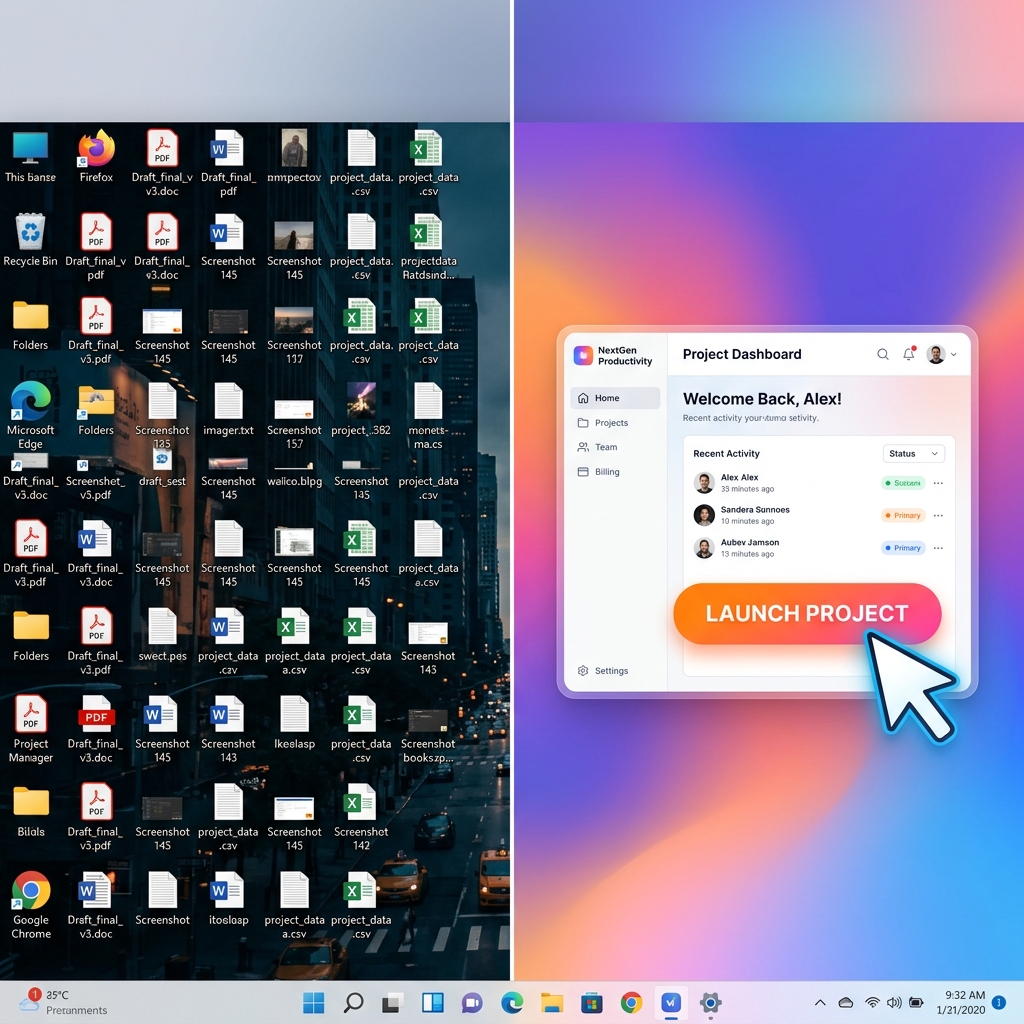
Feature 3: The Studio-Grade Stage
You do not need a fancy office or a professional film studio to make your videos look expensive. You just need to control your digital environment.
If your screen recording shows your messy personal taskbar, unread Slack notifications, or a distracting wallpaper, your startup looks amateur. By isolating your application window and framing it over a dynamic live background or a rich color gradient, you instantly upgrade your brand's visual identity. It turns a basic screen share into a cinematic commercial.
The Ultimate Growth Tool for Bootstrapped Teams
Startups need leverage. You need software that does the work of three people for a fraction of the cost.
This is exactly why Cubix Capture is the ultimate secret weapon for modern startups. It completely eliminates the hidden cost of video editing by acting as your automated production team.
As you record an investor update or a product demo, Cubix Capture does the things a Series B team would normally pay a video editor to do—frame the active part of the UI, settle the cursor into a confident path, hide the desktop behind a clean stage—except it does them at capture time. The file you stop on is the file you send to the cap table. There is no second shift in CapCut, no exported render waiting on your laptop overnight, and no monthly editor seat to expense. That is what lets a four-person seed-stage company look enterprise-grade in front of investors without an enterprise budget.
Related reading:
- Best Screen Recorder for SaaS Founders in 2026
- How to Record a SaaS Product Demo That Converts
- How Indie Hackers Use Screen Recorders to Build in Public
Don’t miss the next one.
Join our newsletter for exclusive tips, product updates, and the latest from the Cubix team.