
If you use Windows 11, you have probably encountered Microsoft Clipchamp. Since acquiring the software, Microsoft has baked it directly into the operating system as the default video creator and screen recorder. It is incredibly convenient, free, and features no watermarks on its basic tiers.
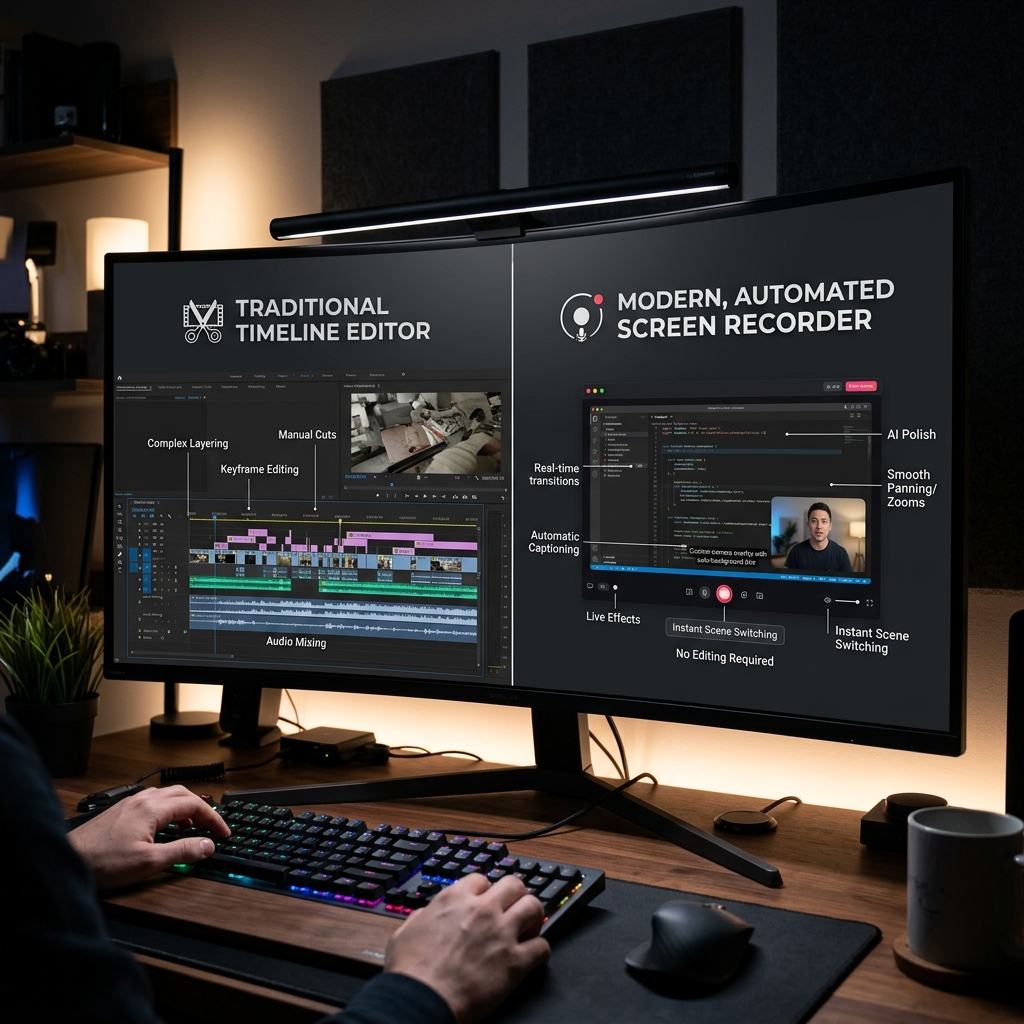
However, as a screen recorder, Clipchamp follows a traditional, slightly outdated workflow. It records a flat, raw capture of your monitor, and then drops that file onto a standard linear editing timeline. If you want to make your recording readable for a mobile audience, you have to spend significant time manually splitting clips, adding custom zoom keyframes, and polishing your cursor tracking.
In 2026, you shouldn't have to spend an hour editing a five-minute screen capture. If you are looking for an alternative that offers smarter real-time tools, instant cloud delivery, or automated cinematic flair, here are five better screen recorders on the market this year.
1. Cubix Capture - The Best Overall Alternative
If your primary goal is to create software tutorials, client presentations, onboarding materials, or product walkthroughs, Cubix Capture is the absolute premier alternative to Clipchamp. It completely replaces the post-production pipeline by operating as an intelligent virtual camera director while you speak.
- Algorithmic Screen Panning & Zooming: This completely eliminates the "tiny text" problem. As you naturally navigate through your workspace or website, Cubix Capture dynamically and smoothly scales up your active windows, ensuring your content is beautifully legible on any mobile device without manual timeline editing.
- Frictionless Cursor Fluidity: Jittery trackpad movements look highly unprofessional. Cubix Capture intercepts your physical mouse data and translates it into a silky-smooth, elegant glide that anchors the viewer’s eye perfectly.
- Instant Studio Framing: It automatically sets your application window against gorgeous, dynamic canvas backgrounds and isolates your facecam into a clean geometric floating bubble with built-in background blurring.
- The Verdict: While Clipchamp gives you a blank canvas that requires manual assembly, Cubix Capture delivers a finished, studio-grade video the exact millisecond you click stop.
2. Loom - The Asynchronous Communication Champion
Sometimes, you don't need a high-end presentation; you just need to send a rapid, casual message to a teammate instead of writing a long email. For fast internal office updates, Loom remains the industry standard.
- Frictionless Link Generation: Loom lives right in your taskbar or browser extension. You hit record, state your point, and the instant you hit stop, a shareable cloud link is copied to your clipboard.
- Automated Documentation: In 2026, Loom features incredibly advanced AI modules that automatically transcribe your video, strip out filler words ("um," "uh"), and generate structured summaries and action steps for your team.
- The Drawback: Loom's free tier limits you to 5-minute videos. It also captures raw, unedited displays without auto-zooms, making it less than ideal for high-end, public-facing product tutorials.
3. Screen Studio - The Premium Mac-Native Option
If you are strictly working inside the Apple ecosystem and want a dedicated desktop tool that popularized the auto-zoom trend, Screen Studio is an exceptional alternative for Mac users.
- Post-Recording Customization: Like Cubix Capture, Screen Studio applies automated zooms to your mouse clicks. However, it saves that coordinate data locally, allowing you to manually adjust the speed, friction, and framing of the cameras on an editing board after the recording is done.
- High-Bitrate Social Exports: It is heavily optimized for rendering beautiful, high-contrast vertical videos, making it a favorite for creators posting software clips to TikTok, YouTube Shorts, or X.
- The Drawback: It is completely unavailable for Windows users and requires local rendering, which can tie up your system resources.
Enjoying this read?
Get weekly insights on video editing, AI workflows, and creator growth straight to your inbox.
4. Camtasia - The Robust Legacy Suite
If you chose Clipchamp because you genuinely enjoy multi-track timeline editing but you simply want a tool that is significantly more powerful, TechSmith's Camtasia is the gold standard for traditional tutorial creators.
- Built-in Annotation Asset Library: Camtasia packages an absolute massive array of pre-built arrows, text callouts, spotlight highlights, and animated transition assets that you can drag and drop onto your footage.
- Advanced Cursor Control: It records your mouse path as an independent vector layer, meaning you can manually smooth it out, increase its size, or change the pointer icon entirely in post-production.
- The Drawback: It carries a steep upfront license cost and demands a manual, step-by-step editing commitment.
5. Capme - The Privacy-First Browser Recorder
If you do not want to sign up for accounts, manage cloud subscriptions, or install executable files on your system, Capme is a brilliant, lightweight browser utility.
- 100% Local Privacy: Capme runs entirely locally within your browser context via client-side scripts. Your data is never uploaded to an outside server during the recording phase, making it highly secure for corporate data or regulated industries.
- Watermark-Free Freedom: Unlike other web extensions that slap giant logos over your content, Capme offers a highly generous free environment with clean, unwatermarked saving directly to your hard drive.
- The Drawback: Because it is web-bound, it lacks advanced AI capabilities, background segmentation, and algorithmic pan mechanics.
Comparison Summary
| Tool | Core Philosophy | Best For | Platform |
|---|---|---|---|
| Cubix Capture | Automated real-time polish | Professional tutorials, demos, client reviews | Windows & macOS |
| Clipchamp | Traditional linear timeline | Basic video stitching and casual cropping | Windows & Web |
| Loom | Fast link generation | Asynchronous internal team updates | Cross-platform |
| Screen Studio | Post-processed camera paths | Mac power users making marketing clips | macOS only |
| Camtasia | Manual asset assembly | Traditional course creators who want full control | Windows & macOS |
Choosing the right recorder comes down to respecting your own time. If you want to piece together traditional video media on a timeline, Clipchamp or Camtasia will serve you well. If you need a fast, temporary message sent to a colleague, Loom is perfect.
But if you want to deliver high-end, professional software tutorials and demos that look incredible on any display, without losing your afternoons to a video editing timeline, upgrading to Cubix Capture is the smartest choice you can make in 2026.
📖 Keep reading: Clipchamp vs Cubix Capture — which is better?, how to use the Clipchamp screen recorder, and the best free screen recorder for Windows.
Don’t miss the next one.
Join our newsletter for exclusive tips, product updates, and the latest from the Cubix team.