
Planning a video before recording saves time on set and reduces friction during editing. But creators often wonder whether they need a visual storyboard, an operational shot list, or both. While both tools outline what happens in a video, they serve fundamentally different functions in video production.
Choosing the right format depends on the primary risk of your project: are you solving a visual composition and framing challenge, or managing technical capture logistics and interface steps?
Quick answer: what is the difference between a storyboard and a shot list?
- A storyboard is a sequence of visual panels (drawings, screenshots, or mockup frames) with accompanying notes. It defines how the video looks and flows visually, mapping camera framing, composition, graphic placements, and visual transitions from shot to shot.
- A shot list is a structured inventory of every take to be recorded. It specifies what must be captured technically, including scene numbers, camera or screen sources, specific user actions, spoken lines, visual result states, and hold durations.
The decision rule:
- Use a shot list when your primary challenge is operational accuracy such as recording a multi-step software walkthrough, ensuring no menu clicks are missed, or managing takes across different screen resolutions.
- Use a storyboard when your primary challenge is visual communication such as pacing a marketing teaser, planning multi-camera framing, or coordinating graphic callouts and cutaway b-roll.
- Use both when a high-stakes project involves both complex visual staging and strict technical execution requirements.
Neither format guarantees audience engagement or replaces careful editing. They are preparation tools designed to eliminate guesswork before you record.
Side-by-side comparison: the same sequence in both formats
To see how the two formats handle the exact same scenario, consider an illustrative 3-step sequence from a fictional project-management tool named TaskFlow: opening a task modal, entering details, and displaying the updated board.
Format 1: The visual storyboard panels
A storyboard arranges this sequence as visual frames with layout notes:
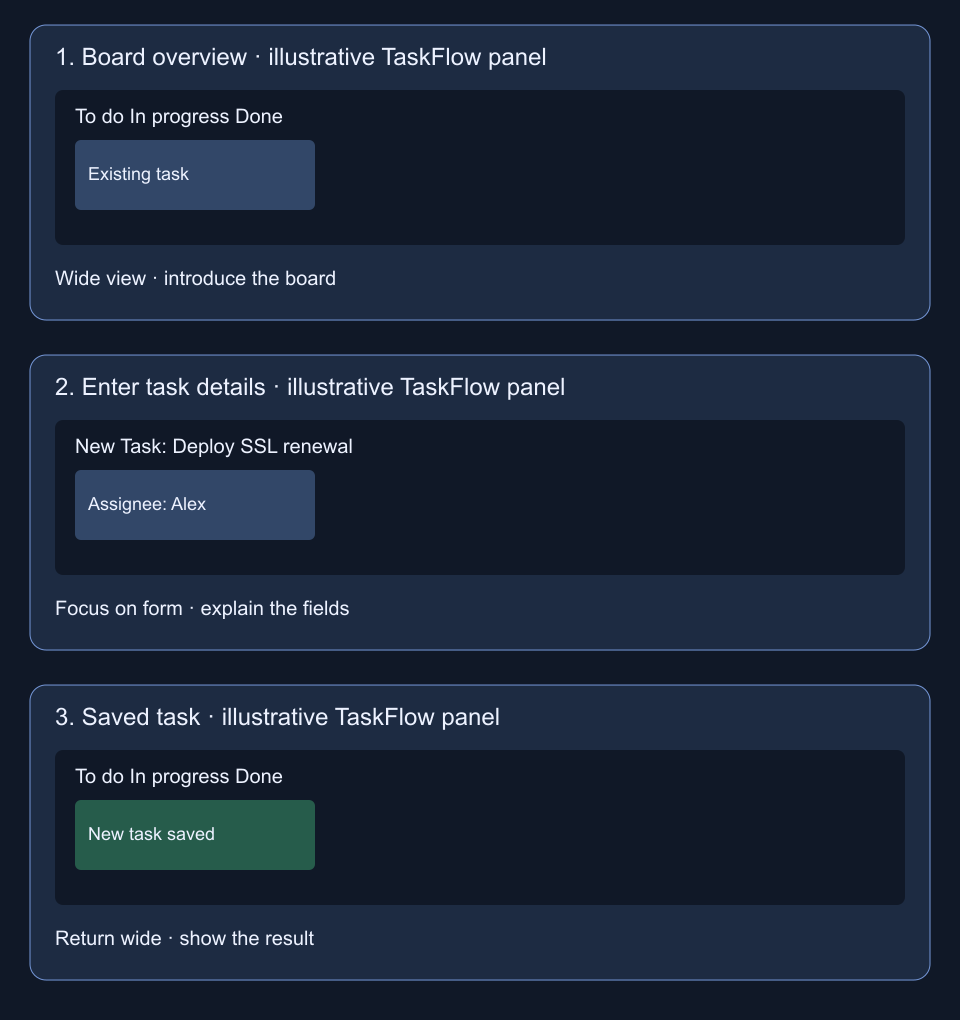
These are illustrative drawings of a fictional interface, not screenshots or a tested product result.
- Panel 1 (Wide Framing): Establishes the full board context. The note indicates a static hold while the voiceover introduces the backlog.
- Panel 2 (Center Focus): Shows the creation modal centered on screen with form fields highlighted. The note indicates a smooth punch-in zoom to emphasize field readability.
- Panel 3 (Completion & Highlight): Returns to the board view showing the newly inserted card and an accent callout on the success toast.
The storyboard immediately communicates visual balance, where the viewer's eye should focus, and how the camera scale shifts between wide context and tight detail.
Format 2: The structured shot-list table
The same sequence in a shot list organizes operational capture criteria:
| Shot # | Purpose | Source / Framing | Action | Dialogue Cue | Expected Result | Technical Notes |
|---|---|---|---|---|---|---|
| 1 | Establish board baseline | Screen capture (1920x1080 @ 60fps) | Cursor stationary near project title | "Here is your team backlog before planning begins." | Clean Kanban board with synthetic tasks | Hold 2s before cursor moves; browser zoom 125% |
| 2 | Open modal and enter data | Screen capture (window focus) | Click '+ New Task', type 'Deploy SSL renewal', assign 'Alex' | "Enter your summary and assign your engineer." | Form fields filled with high-contrast text | Keep typing steady; avoid mouse wandering |
| 3 | Confirm save and outcome | Screen capture (1920x1080) | Click 'Save Task' button | "The task logs instantly to your active sprint backlog." | Modal dismisses; card renders with 'New' badge | Hold static for 3s after toast appears for review handles |
The shot list tells the person recording exactly what software state to load, what action to execute, what audio line corresponds to the take, and what technical parameters to maintain.
What each format records (and where they overlap)
Understanding the distinct information captured by each document prevents redundant planning:
| Dimension | Storyboard | Shot List |
|---|---|---|
| Primary focus | Visual composition and narrative flow | Production execution and take logistics |
| Representation | Visual panels (sketches, wireframes, stills) | Tabular rows and structured checklists |
| Framing & scale | Explicit visual boundaries, camera angles, safe zones | Textual labels (e.g., '1080p wide', '140% crop') |
| Motion & transitions | Arrows showing camera panning, zooms, cut types | Written directions in action and notes columns |
| Audio integration | Voiceover cues matched directly under frames | Script lines or dialogue markers per row |
| Operational metadata | Rarely tracked | Screen resolutions, frame rates, take numbers, file names |
| Best used by | Directors, clients, animators, review teams | Screen recorders, videographers, editors |
The overlap
Both formats share two fundamental elements: sequence and narrative purpose. Both documents help you check whether each visual moment supports the message.
Enjoying this read?
Get weekly insights on video editing, AI workflows, and creator growth straight to your inbox.
Decision framework: which should you choose?
Use this practical rubric to determine the right planning tool for your upcoming project:
Scenario A: Software demos and product walkthroughs
- Recommended format: Shot list
- Why: In pure screen recording, the software UI dictates the composition. Your main production risk is forgetting a step, inputting inconsistent demo data, or missing a confirmation screen. A detailed product demo shot list keeps your takes organized without requiring hand-drawn sketches.
Scenario B: Customer stories and mixed talking-head videos
- Recommended format: Combined storyboard and shot list
- Why: Customer videos transition between on-camera speakers, product interface cutaways, and customer quotes. A storyboard helps plan where b-roll cutaways appear over spoken dialogue, while a shot list ensures your production crew captures all interview angles and screen inserts.
Scenario C: Social media ads and short-form clips
- Recommended format: Storyboard
- Why: Short social videos often need an opening that is clear without extra context. A storyboard helps you plan that opening, text placement and framing before recording; it does not guarantee retention.
Scenario D: Re-editing existing footage
- Recommended format: Stills storyboard
- Why: When working with existing recordings, creating visual panels from extracted stills helps you reorganize footage before re-cutting. See our guide to making a storyboard from existing video frames.
Moving from your chosen plan to recording
Whichever planning tool you select, follow these guidelines to transition smoothly into production:
- Keep the plan accessible during recording: Display your shot list on a second monitor or print your storyboard panels so you can check off takes as you execute them.
- Record safety holds: Leave a short hold before and after each action; two seconds is a starting point for this example, not a fixed rule.
- Log take variations: If you record three attempts of a tricky interaction, mark the preferred take number directly on your shot list.
- Transition to the editing timeline: Once capture is complete, import your footage and align the best takes to your plan. For detailed buyer-facing demonstrations, explore our overview of product demo video creation.
Planning reference
Adobe’s storyboard guide describes frames, shot numbers, dialogue and direction notes. The TaskFlow drawings and capture choices above are our illustrative example.
Don’t miss the next one.
Join our newsletter for exclusive tips, product updates, and the latest from the Cubix team.