
Turn your video podcast into standalone short clips
Upload a recorded video episode and Social Clips proposes candidate moments. Keep the ones that stand alone, then refine the opening, speaker crop and captions of each before exporting it for Shorts, Reels or TikTok.
Starts from an uploaded video file. No YouTube link import, podcast-host connection or posting from Cubix: you export each clip and post it yourself.
Uploaded video episode · 52:00
Clip 1 · practical answer
08:42–09:21
Clip 2 · counterintuitive point
23:10–23:52
Clip 3 · complete short story
37:05–38:02
Rejected: starts on “That’s why…” and ends before the answer.
One episode, four candidates
A fictional episode in which two founders talk about pricing. Four candidate moments, three worth keeping. Each kept clip has to make sense to someone who has never heard the show.
Episode 18 · “Pricing your first product” · 52:00 · fictional
08:42–09:21
Keep · clip 1
A practical answer
“Price the first version for the customer you actually have, not the one you hope to get.”
Why it stands alone: The first sentence names the topic and gives the answer. The speaker’s condition, “until you have ten paying teams”, comes before the end, so the advice is not stripped of its qualification.
23:10–23:52
Keep · clip 2
A counterintuitive point
“Our cheapest plan brought in the most support tickets, not the most customers.”
Why it stands alone: A surprising claim, and the reason for it, inside the same clip. It ends once the point resolves, before the hosts move on.
37:05–38:02
Keep · clip 3
A complete short story
“The week we doubled the price, two things happened.”
Why it stands alone: It has a beginning, a middle and an end: the change, what happened, and what they learned. Nothing in it depends on the rest of the episode.
30:18–30:40
Reject
Rejected candidate
“That’s why we stopped doing it.”
Why not: “That” and “it” point to something said two minutes earlier, and the clip ends before the speaker says what they did instead.
To save it: Start earlier, where the topic is named, and end after the answer. If that makes it too long, leave it out.
A candidate is a suggestion, not a finished clip. Keep the ones that open with the topic and close on the answer; fix or drop the rest.
Illustration · a fictional episode, lines and timecodes written for this page. Not a recording, a transcript, a Social Clips result or a recommended length.
From one episode to reviewed clips
How Social Clips works in Cubix today, step by step.
- 1
Upload the recorded episode
On the app home, choose Create clips and upload the video file. Pasting a YouTube link is not available, so start from the file. The button on this page opens the app; it does not upload anything for you.
- 2
Choose Length and Clips
These are the two settings before Cubix looks for moments.
- Length: Auto, 15–30s or 30–60s
- Clips: Auto, 3, 5 or 10
- 3
Review every candidate
Candidates arrive ranked, with a Best pick. Watch each one from its first word to its last before you decide to keep it.
- 4
Refine and export one at a time
Quick edit changes the layout, headline and captions; Continue in full editor opens the clip on the timeline for anything else. Export each clip you keep, then post it yourself.
Each candidate shows a virality score. Cubix describes it as an AI estimate based on the clip’s hook, payoff and social potential that does not guarantee performance. Use it to decide what to watch first, not what to publish.
If none of the candidates work, you can generate a new set and say what should be different. A new set replaces the current clips and any edits you made to them.
Check each clip before export
Six checks for every clip you keep. Automatic framing and captions are a starting point; you are the one who knows what was said.
- 1
The opening names the topic
A viewer who has never heard the episode knows what this is about within the first sentence.
- 2
The answer keeps its qualifications
Conditions like “until you have ten paying teams” stay in, so the clip does not say more than the speaker did.
- 3
The ending resolves the idea
The clip stops after the point lands, not mid-thought and not after the conversation has moved on.
- 4
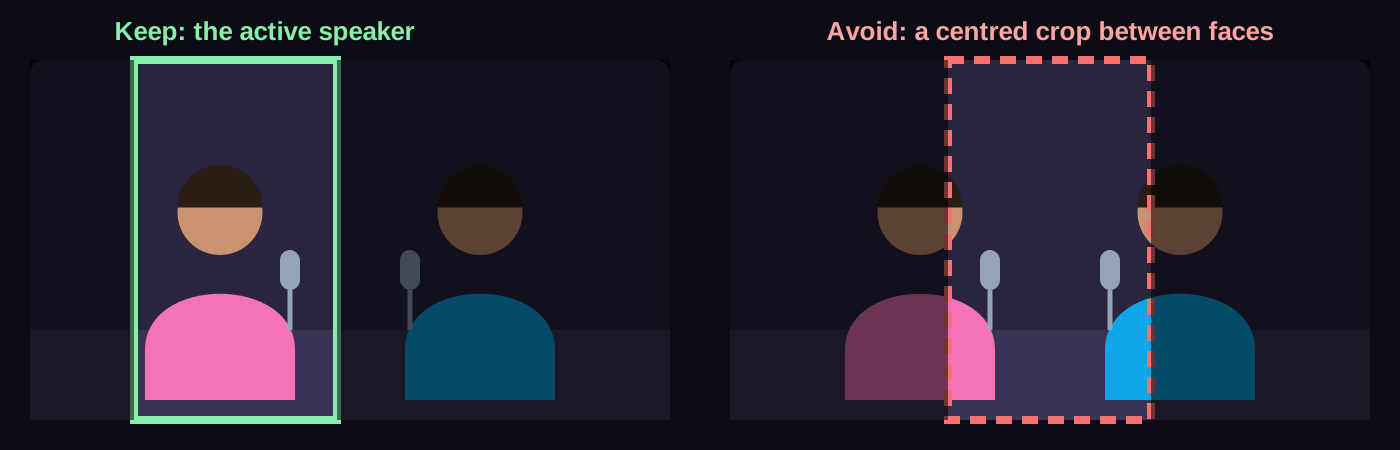
The crop follows the right person
The active speaker stays in frame, and so does anything they point to or hold up.
- 5
Names, terms and numbers are right
Read the captions against the audio. Product names, prices and percentages are where errors matter most.
- 6
Text is legible in the exported shape
Captions and headlines are readable at phone size and clear of the parts of the screen that the app covers.
Step by step: add and edit captions · reframe for vertical
Podcast to shorts FAQs
Do I have to upload a file?
Yes. Upload the recorded video episode as a file. Pasting a YouTube link is not available, and Cubix does not connect to podcast hosts or RSS feeds.
How is this different from a trailer or full-episode editing?
Each short has to stand on its own. An episode trailer assembles moments you chose into one promotion that points to the full episode, and full-episode editing cleans up the whole recording. This page is for several separate clips from one episode.
Can I revise each clip?
Yes. Quick edit changes a clip’s layout, headline and captions, and Continue in full editor opens it on the timeline for changes to the start, end and anything else. Generating a new set replaces the current clips and any edits you made to them.
How do I check the captions and the crop?
Play each clip with sound and read the captions against what was said, especially names, terms and numbers. Watch the framing through every change of speaker, and check anything shown on screen stays visible in the vertical frame.
Does Cubix publish clips to TikTok, Reels or Shorts?
No. Export each clip you keep, then post it yourself. Clips export one at a time; there is no posting or scheduling from Cubix.
What access do I need to make and export clips?
You can open Cubix and explore before choosing a plan. Create Clips uses credits based on the length of the source video. Current plans, trial availability, credits, export options and billing are on the pricing page.
Turn your next episode into clips that stand alone.
Upload the recorded episode, review the candidates Social Clips proposes, and refine each clip before you export it.
Make clips from my podcast