
An episode trailer invites someone into a longer conversation. It gives them a reason to hear the whole episode and ends by pointing there. A standalone highlight clip gives the viewer one complete, worthwhile idea that makes sense without the episode. The two overlap in practice, because a good highlight can also bring people to the show, so decide which job comes first before you cut.
One excerpt, two edits
The excerpt below is written for this article. Episode 41 and its guest are fictional; the times show where each line would sit in the recording.
| Source time | Line |
|---|---|
| 18:02 | Host: How did you decide what to build next? |
| 18:05 | Guest: For a while we sorted requests by urgency. Whoever sounded loudest went first. |
| 18:12 | It felt responsive, but customers kept getting stuck on the same unfinished jobs. |
| 18:20 | So we grouped requests by the job the customer was trying to finish, not by how urgent the message sounded. |
| 18:31 | That doesn't mean urgent bugs wait. A broken checkout still goes first. |
| 18:37 | But for everything else, finishing one whole job beat fixing ten fragments. |
| 18:44 | And the first job we finished that way changed how we hire. That's a story for later. |
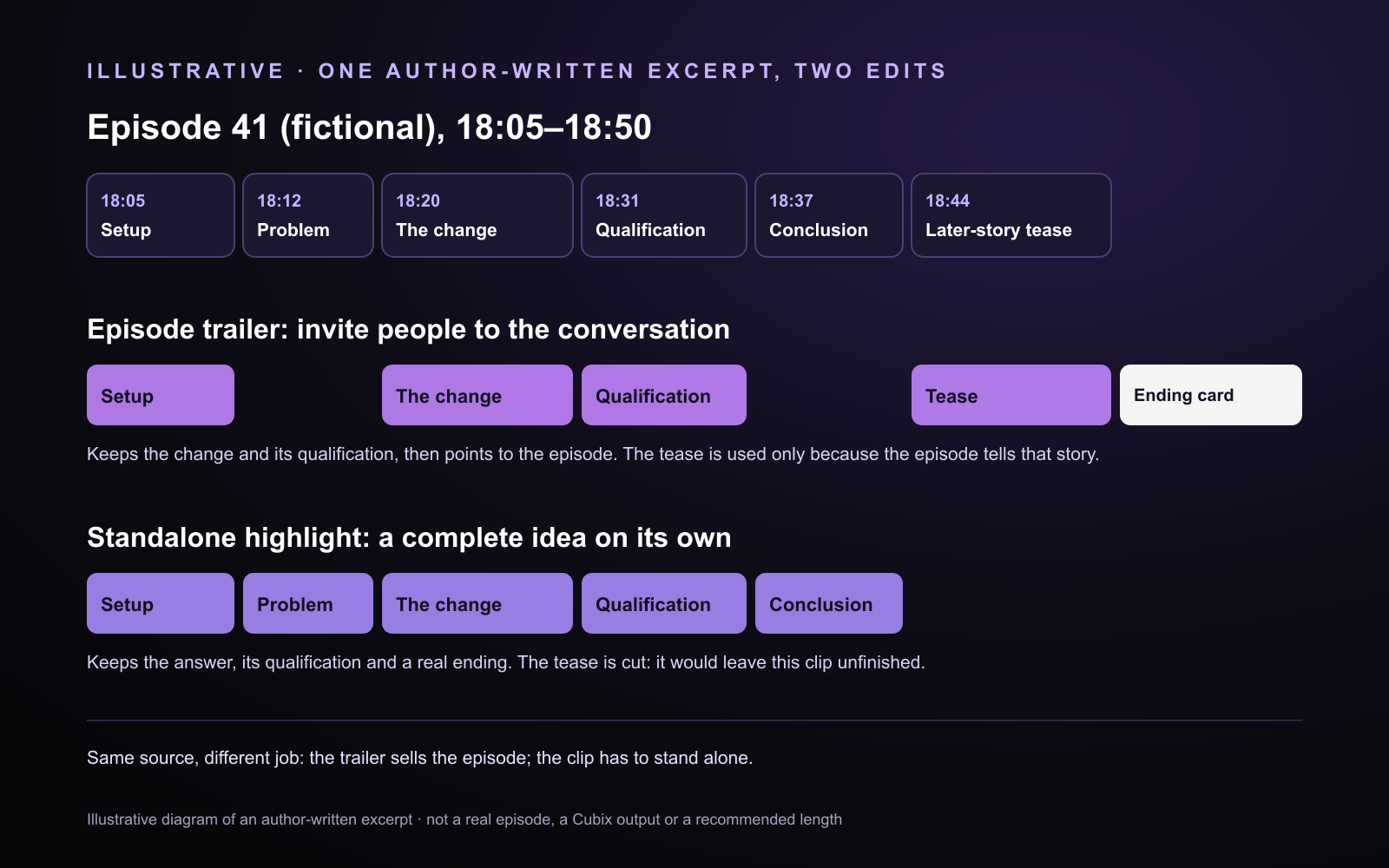
Illustrative diagram of an author-written excerpt. It is not a real episode, a Cubix output or a recommended length.
The trailer outline
- 18:05–18:12, the setup. Opens on the old habit.
- 18:20–18:36, the change and its qualification. The decision the episode is about, with "urgent bugs still go first" kept so the claim is not stronger than what the guest said.
- 18:44–18:50, the tease. "Changed how we hire" gives a reason to listen. It is fair to use only because the episode does tell that story.
- Ending card. "Episode 41 · Finish the job first · Full conversation out now."
The trailer leaves the outcome open and sends people to the episode. It must not suggest the episode says something it does not.
The standalone clip outline
- 18:05–18:43, one continuous passage: the setup, the problem, the change, the qualification and the conclusion.
- It starts on the guest's first line. The answer frames itself, so the host's question is not needed.
- It ends on "finishing one whole job beat fixing ten fragments." The tease is cut: it opens a story this clip never finishes.
Trailer or highlight: how they differ
| Episode trailer | Standalone highlight clip | |
|---|---|---|
| Purpose | Bring people to the full episode | Give one complete idea on its own |
| Context | Enough to make the hook matter, and honest about what the episode covers | Everything the idea needs to be understood without the episode |
| Source selection | Several short moments, often from different parts of the episode | Usually one passage, trimmed |
| Completeness | Can leave the answer open, as long as the episode resolves it | Delivers its answer, with any qualification that changes its meaning |
| Ending | Points to the episode: its title and where to find it | Ends when the idea ends |
These are tendencies, not rules. Neither output has a fixed length, and each platform sets its own limits. Apple's guidance for podcasters on trailers describes trailers built from moments that show what the listening experience is like, ending with a clear next step for listeners.
Choose the workflow
For a trailer, choose the excerpts yourself, then assemble them in Cubix on the editable timeline: name the ranges in a request, or split, trim and reorder the clips yourself. The podcast trailer page walks through a full plan and an editing brief you can adapt.
For standalone clips, start from the long recording and use Social Clips to get candidate clips. Social Clips makes separate clips; it does not stitch a trailer, and not every candidate will be ready to publish as it is. Review each one for a complete opening, answer and ending. The guide to reviewing automatic clip candidates has a checklist.
Review before you publish
- No quote joins that change what anyone said.
- Names and context make sense to someone new to the show.
- The trailer is honest about what the episode contains.
- The standalone clip delivers its answer and its qualification.
- Captions, crop and ending are checked wherever you added them.
Related reading
- Podcast editing in Cubix, for the full episode.
- How to edit podcast clips, for framing, captions and context.
Source: Apple Podcasts for Creators, "Make the next great podcast trailer", checked November 5, 2026. The example, outlines and diagram were written for this article.