
Beat sync and audio sync sound alike, but they fix different problems. Beat sync decides where the picture changes, so the cuts move with a piece of music. Audio sync lines up two recordings of the same moment, such as a camera clip and a separate microphone, so speech matches the lips. One project can need both, but each is its own job with its own tools.
If you already know you want your shots to change with a song, sync my clips to music. If your sound and picture do not line up, read the section on that below instead.
Two timing jobs, side by side
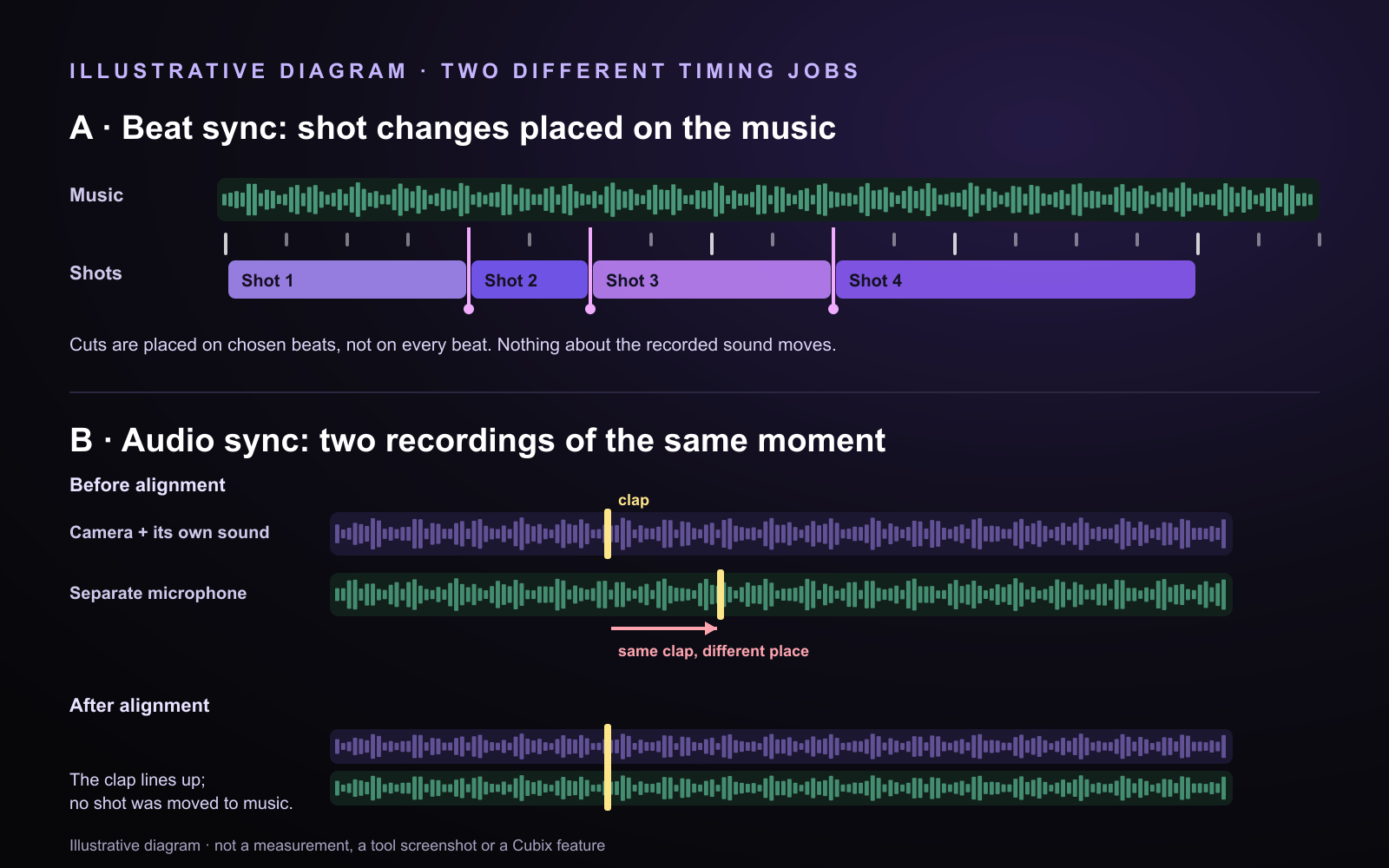
Illustrative diagram, drawn for this article. It is not a measurement, a tool screenshot or a Cubix feature.
Row A, beat sync. A music track has a regular pulse. The editor places each shot change on a beat they choose, usually not on every beat, so some shots hold longer than others. The sound does not move; only the picture changes.
Row B, audio sync. The same clap was recorded twice: by the camera's own microphone and by a separate recorder. Before alignment, the two claps sit at different points in time. After alignment they line up, so speech and lip movement match. No shot is moved to the music.
Which job do you have?
| What you are seeing | The job | Where to go next |
|---|---|---|
| You want the shots to change with a song | Beat sync | Cubix Beat Edits |
| A separate microphone and the camera do not line up | Audio and video synchronization | A synchronization step in your editor, before you cut |
| An imported video is late, early or drifting | Troubleshooting the file or project | Audio and video out of sync after import |
Beat Edits times cuts to music. It does not repair lip sync, drift or the alignment of a separate recorder.
If your shots should change with the music
This is a music-led montage job. Canva's Beat Sync page describes the same kind of job: timing footage to the beat of a soundtrack. In Cubix, it is Beat Edits:
- Add at least two video clips or photos and a music track: your own upload or one from the built-in library.
- Run Beat Edits. It analyzes the track for tempo and hits and times the cuts to it. Cut on the hits is the default; a steady BPM grid is the alternative.
- Play the result with sound. Hold the shots that need time, let each action finish before its cut, and end on a deliberate final shot.
The guide to editing video to the beat of music covers each control step by step.
When sound and picture do not match
This is a different diagnosis, and Beat Edits is not the tool for it.
Two recordings of one moment. If you recorded sound on a separate microphone, the camera and the recorder started at different times. Lining them up is its own editing step: editors match the recordings at a shared point, such as a slate clap, matching timecode or a marker. Adobe's Premiere Pro help, for example, treats this as synchronizing audio and video. Do it before you cut to music.
A file that goes out of sync after import. If the sound is early or late by the same amount from start to finish, that is a fixed offset. If the gap grows as the clip plays, that is drift, and it usually has a different cause. Start with audio and video out of sync after import, which compares the source, the preview and the export to narrow down the problem.
Can one project need both?
Yes. A performance filmed with a separate audio recorder may need its sound aligned first and its shots cut to music afterwards. Align first: a beat-synced edit built on misaligned sound will still look out of sync.
Does Beat Edits fix speech that is out of sync?
No. Beat Edits changes where shots cut against a music track. It does not move speech to match lips, correct drift or line up a separate recording.
Choose your next step
- Shots should move with a song: Cubix Beat Edits, then how to edit video to the beat of music.
- A separate microphone needs lining up: use your editor's audio and video synchronization step before you edit.
- An imported file is offset or drifting: diagnose audio and video out of sync after import.
- A montage from photos or event clips: photo montages to music and event recaps.
Sources: Canva Beat Sync, checked November 5, 2026. Adobe Premiere Pro: Synchronize audio and video. Cubix steps come from the Beat Edits page and the beat-editing guide.