
If you have watched a software tutorial, coding walkthrough, or SaaS product demo recently, you have likely witnessed a subtle revolution in video editing.
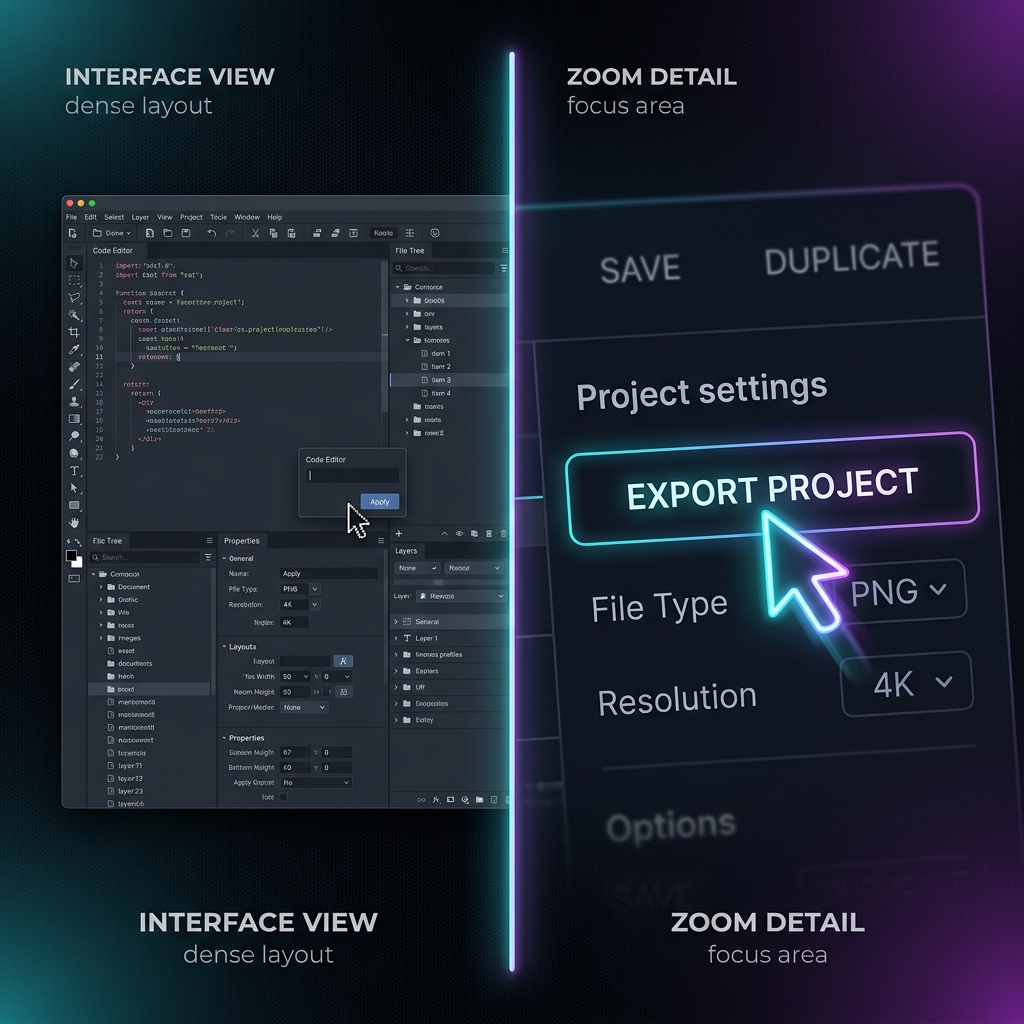
A creator explains a settings panel, and the camera seamlessly glides inward to magnify the drop-down options. They type out a dense line of code, and the screen smoothly pans to make the exact syntax perfectly clear. There are no sudden, jarring cuts just a fluid, cinematic motion that looks like a live camera operator is tracking the mouse cursor across the desktop.
Historically, achieving this level of visual polish required hours of painstaking keyframing inside a heavy video editor. Today, elite educators and creators are automating this entire process using algorithmic auto-zoom.
But auto-zoom isn't just an aesthetic luxury; it is a powerful psychological tool. Here is the unvarnished breakdown of why auto-zoom radically boosts student engagement, drives retention spikes, and transforms how audiences absorb technical knowledge.
1. It Completely Crushes the Mobile Readability Crisis
The single biggest threat to a tutorial video's engagement metrics is where the audience is watching. Over 60% of digital educational videos are consumed on mobile devices.
If you record a software guide or a spreadsheet template on a large 27-inch 4K monitor, everything looks perfectly legible to you while filming. But when that massive desktop environment is compressed onto a 6-inch smartphone viewport, your user interface layout shrinks aggressively.
[ Flat Monitor Capture ] ---> Compressed onto 6" Phone ---> Text is Microscopic (Viewer Bounces)
[ Auto-Zoom Capture ]   ---> Cropped dynamically     ---> Text stays 1:1 Crisp (Viewer Retained)
The exact millisecond a student has to squint to read a line of code or see which button you clicked, cognitive fatigue sets in and they swipe away. Auto-zoom instantly eliminates this friction. By tracking your mouse data dynamically and scaling down the visible canvas to focus purely on active windows, text stays incredibly crisp and readable on any smartphone.
2. It Leverages the Psychology of Motion and Depth Shifts
Human eyes are biologically hardwired to respond to motion and focal depth changes. In our evolutionary psychology, static environments blend into the background, while movement triggers instant focus.
When a software tutorial remains completely flat and stationary for ten straight minutes, the viewer's brain quickly treats it like a static document. Visual boredom sets in, their eyes glaze over, and their attention drifts to other browser tabs or social media notifications.
Auto-zoom introduces dynamic, fluid pacing to technical content. The subtle camera glides, gentle pans, and deliberate framing shifts mimic the cinematic language of an intentional film production. This constant, gentle visual stimulation keeps the viewer's brain active, alert, and locked onto the screen, driving a massive spike in Average View Duration (AVD).
3. It Explicitly Directs Cognitive Focus (Lowering the Strain)
Modern software dashboards are incredibly dense. If you open an app like Photoshop, Salesforce, or a full-stack IDE, the screen is flooded with hundreds of tiny icons, timeline tracks, sidebars, and data rows.
When a beginner watches a full-screen flat recording of a complex interface, their brain is forced to do double duty: they have to listen to your vocal instructions while simultaneously hunting across the crowded monitor to find your tiny mouse cursor. This creates high cognitive load the psychological term for overwhelming a student's working memory.
Auto-zoom acts as a digital pointer. By automatically zooming in on the exact menu panel or code block you are discussing, it physically crops out the surrounding visual noise. Your viewer doesn't have to scan the screen to find you; the software frames the answer perfectly for them, making the lesson significantly easier to digest and remember.
Enjoying this read?
Get weekly insights on video editing, AI workflows, and creator growth straight to your inbox.
The Workflow Revolution: Shifting to Automated Production
The old method of manually animating camera pans and zooms on a video editing timeline is a massive time sink. Creators had to slice clips, adjust interpolation speed graphs, and manage keyframes frame-by-frame turning a simple 5-minute video into a two-hour editing chore.
Modern presentation recorders like Cubix Capture have completely shattered this post-production tax by moving the cinematography directly into the recording session itself.
-
Sanitize Your Digital Workspace: Clear out desktop background noise. Hide your desktop icons, close unrelated browser tabs, and hide your bookmarks bar. Switch your operating system configuration into Do Not Disturb mode to block personal notifications from hijacking student attention.
-
Adopt a Deliberate Physical Pace: Provides tracking software with clean visual cues. Move your mouse cursor across your application at half-speed. When approaching a button or dropdown menu, hover over it for a full second before clicking. This deliberate choreography ensures the automated tracking engine applies smooth, organic camera transitions.
-
Conclude the Recording and Share: Bypass the editing bay completely. Hit stop. Because smart recorders handle your canvas backdrops, AI cursor path smoothing, and algorithmic focus zooming automatically while you speak, your tutorial is fully polished and ready to export the exact millisecond you finish presenting.
Summary Value Matrix: Flat vs. Auto-Zoom Captures
| Engagement Metric | Traditional Flat Captures | Automated Auto-Zoom Captures |
|---|---|---|
| Mobile Screen Delivery | Microscopic labels (High drop-off rate) | Crisp, readable text layouts (High retention) |
| Viewer Brain Fatigue | High cognitive load (Hunting for the mouse) | Zero friction (Visual focus is directed instantly) |
| Pacing & Dynamics | Monotonous, flat, and visually stagnant | Cinematic, fluid, and engaging camera glides |
| Time Spent Editing | Hours of manual timeline keyframing | Zero seconds (Processed live while you talk) |
Ultimately, maximizing tutorial engagement isn't about working longer hours in an editing suite; it's about respecting your viewer's viewport and your own creative calendar. By deploying a smart recording platform like Cubix Capture to handle your framing and auto-zooms dynamically, you deliver an elite, mobile-optimized learning experience that holds attention and drives educational retention automatically.
Keep Reading
- Why Your Tutorial Videos Lose Viewers (And How Auto-Zoom Fixes It)
- The Psychology of Zoom: Why It Matters for Viewer Retention
- How Auto-Zoom Replaces 90% of Tutorial Video Editing
- How Tutorial Creators Are Using Auto-Zoom to Get More Views
- What Is Auto-Zoom in Screen Recording? (And Why It Changes Everything)
Don’t miss the next one.
Join our newsletter for exclusive tips, product updates, and the latest from the Cubix team.