
If you have watched a software tutorial, a coding walkthrough, or a product demonstration video recently, you have likely noticed a major shift in production quality.
A creator clicks a small dropdown menu in an application, and the camera seamlessly glides inward to magnify the choices. They navigate to a complex line of code, and the screen smoothly pans to make the syntax perfectly clear. There are no sudden, jarring cuts just a fluid, cinematic motion that feels like a professional camera operator is live-tracking the cursor across the display.
Historically, achieving this effect required hours of painstaking post-production editing. Today, elite creators are leveraging a technology that handles this entire process instantly: Auto-Zoom.
But what exactly is auto-zoom, how does it work under the hood, and why is it fundamentally changing the digital education and video creation landscape? Let's dive in.
The Tech Explained: How Auto-Zoom Works
At its core, auto-zoom is an intelligent, context-aware cinematography engine embedded directly into a screen recorder.
Traditional screen recorders function like passive security cameras they blindly capture a flat, rigid pixel map of your entire monitor. If you move your mouse to the corner of a 4K screen, the recorder simply logs those pixels from afar.
An auto-zoom recorder, such as Cubix Capture, acts like a smart virtual director. While you speak and move your mouse, the software monitors your interaction data in real-time. It tracks:
- Your explicit cursor coordinates ($X$ and $Y$ pixel points).
- Your physical mouse clicks and text input focuses.
- Active state changes within target application windows.
The exact millisecond you trigger an action like clicking a tiny settings gear or typing into a terminal the software applies predictive framing algorithms. It calculates the optimal focal window and uses smooth canvas scaling to glide the camera inward toward the action, completely eliminating manual post-production camera work.
Why Auto-Zoom Changes Everything: The 3 Big Breakthroughs
1. It Solves the Mobile Readability Crisis
The single biggest problem facing video tutorial creators today is the shift in where audiences watch content. Over 60% of digital educational videos are consumed on mobile phone screens.
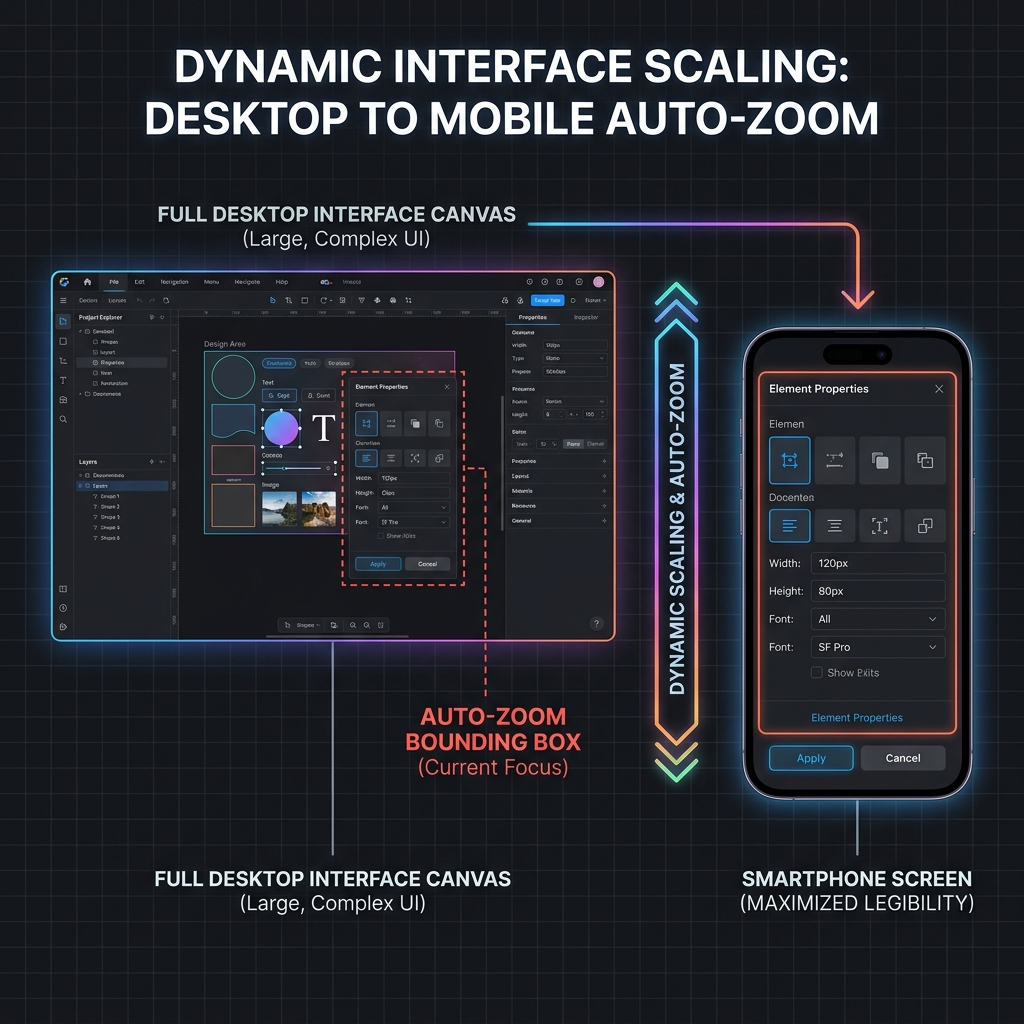
If you record a software guide on a large 27-inch desktop monitor, everything looks perfectly legible to you while filming. But when that massive desktop environment is compressed onto a 6-inch smartphone screen, your text shrinks aggressively and becomes microscopic. The moment a student has to squint to see what you are doing, they swipe away.
Auto-zoom completely neutralizes this bottleneck. By instantly scaling down the visible canvas area to focus strictly on your active application windows or input boxes, user interface text remains perfectly crisp and legible on even the smallest smartphone viewports.
2. It Drives Massive Retention Spikes
Human eyes are naturally wired to respond to motion and depth shifts. When a software tutorial remains completely flat and stationary for ten minutes, the viewer's brain quickly treats it like a static document. Visual fatigue sets in, attention drifts, and retention drops.
Auto-zoom introduces dynamic, fluid pacing to technical content. The subtle, organic camera glides and focus framing shifts mimic high-end cinematic standards. This constant, gentle visual stimulation keeps the viewer's brain highly engaged, leading to dramatic increases in Average View Duration (AVD) the golden metric that recommendation algorithms use to promote video channels.
3. It Completely Eliminates the "Timeline Tax"
The old way of producing a polished, mobile-friendly tutorial video is incredibly tedious:
-
Step 1: Raw Capture: Record the Full Static Screen Filming the tutorial completely flat, capturing all background noise and full desktop canvas details over the course of an hour.
-
Step 2: Import & Slice: Segment the Footage on a Timeline Dumping the raw MP4 video file into a heavy editor like Premiere Pro or DaVinci Resolve and cutting the video track into dozens of individual fragments based on mouse clicks.
-
Step 3: Manual Animate: Keyframe Camera Scales Frame-by-Frame Manually calculating scale percentages, positioning anchor points, and adjusting interpolation speed graphs for every single zoom-in and zoom-out transition.
-
Step 4: Render & Export: Wait for Processing Pipelines to Clear Waiting for your machine to process the complex keyframe coordinates and render out a final, compressed video file to upload.
With auto-zoom, this entire timeline is completely flattened. Because the recording engine handles your camera movements, graphic window framing, and background canvas staging live while you talk, your tutorial video is fully styled, polished, and ready to share the exact millisecond you click stop. A two-hour editing chore shrinks down into a zero-second wait.
Enjoying this read?
Get weekly insights on video editing, AI workflows, and creator growth straight to your inbox.
Shifting to an Automated Creator Stack
The modern creator economy rewards two things: production quality and content velocity. If you spend your entire weekend editing camera pans for a single 5-minute video, you cannot create enough volume to scale your brand.
By upgrading your recording workspace to an automated system like Cubix Capture, you move the cinematography directly into the capture phase. Alongside algorithmic auto-zooms, it bundles in AI Cursor Path Smoothing to translate naturally frantic, shaky mouse hand movements into elegant, cinematic glides.
If you are a streaming engineer building a live multi-camera broadcast stream for esports, traditional flat recorders like OBS Studio give you excellent control over raw hardware bitrates. But if your goal is to save your schedule, protect your creative energy, and publish flawless, mobile-optimized software tutorials instantly, auto-zoom isn’t just an interesting feature it’s the definitive modern standard that changes everything.
Keep Reading
- Auto-Zoom Screen Recording - How It Works and Why You Need It
- Why Auto-Zoom Makes Tutorial Videos More Engaging
- What Is Auto-Zoom Screen Recording? (Complete Guide)
- How Auto-Zoom Technology Actually Works
- Screen Recorder with Auto-Zoom - Every Option in 2026
- Why Auto-Zoom Is the Most Important Feature Nobody Talks About
Don’t miss the next one.
Join our newsletter for exclusive tips, product updates, and the latest from the Cubix team.